

Introduction
Do you have knowledge of Kubernetes and DevOps, and available GPU resources, but find it challenging to manage these resources? If so, you can install and manage VESSL directly on your resources. By using scripts provided by VESSL AI, you can register clusters and utilize VESSL’s powerful MLOps features on your computing resources.Before you begin
Ensure you have the following prerequisites. This guide provides generic instructions for Linux distributions based on Ubuntu 22.04.Operating System
Operating System
- Ubuntu 20.04, CentOS 7.9 or above.
Hardware Requirements
Hardware Requirements
- At least 2 GB of RAM per machine.
- At least 2 CPUs per machine.
- At least 500 GB of storage or more.
Software Requirements
Software Requirements
- Python 3.8 or above is installed.
- Helm is installed.
Network Requirements
Network Requirements
- Full network connectivity between all machines in the cluster (public or private network).
- Unique hostname, MAC address, and product_uuid for every node. See here for more details.
- Ensure the machine’s hostname is in lowercase.
- Certain ports must be open on your machines. See here for more details.
- We recommend that all nodes have static IP addresses, regardless of whether they are on a public or private network.
VESSL Accounts and Organization
VESSL Accounts and Organization
- Make sure you have active VESSL accounts and organization setup.
- Your VESSL account must have admin privileges in the organization.
Step-by-step Guide
Install GPU-relative Components
If your nodes have NVIDIA GPUs, you need to install the following programs on all GPU nodes that you want to connect to the cluster. If a node does not have a GPU, you can skip this process.1
NVIDIA Graphics Driver
Follow this document to install the latest version of the NVIDIA graphics driver on your node.
2
NVIDIA Container Runtime
Follow this document to install the latest version of the nvidia-container-runtime on your node.
3
NVIDIA CUDA Toolkit
Setup Control Plane Node
1
Download bootstrap script
First, download the script on the node you want to use to manage your cluster (referred to as the control plane in Kubernetes).This script includes everything needed to install k0s and its dependencies for setting up an on-premises cluster. If you are familiar with k0s and bash scripts, you can modify the script to suit your desired configuration.
2
Execute bootstrap script
To designate this node as the control plane and proceed with the Kubernetes cluster installation, run the following command:
3
Copy and paste token
After completing the installation, you will receive a token similar to the one shown in the screenshot. Copy and save this token.
Advanced: Taint Control Plane Node
By default, VESSL’s workloads are also deployed on the control plane. However, if you do not need to allocate Machine Learning workloads to the control plane node due to resource constraints or for ease of management, you can prevent workload allocation by using the following command during installation:Advanced: Select a Specific Kubernetes version
Verify Control Plane Setup
To verify that the installation was successful and that the pods are running correctly, enter the following commands:1
Check Node Configuration
It may take some time for the nodes and pods to be properly deployed. After a short wait, check the node configuration by entering:
2
Check Pod Status
To check the status of all pods across all namespaces, use the following command:
Setup Worker Node
After completing the Control Plane setup, you can configure the worker nodes using the command issued during the Control Plane setup. Execute the following command on the worker node you want to connect:[TOKEN_FROM_CONTROLLER_HERE] with the actual token you received from the Control Plane setup.
Create VESSL Cluster
The VESSL cluster setup is performed on the Control Plane node.1
Install VESSL CLI
If the VESSL CLI is not already installed, use the following command to install it:
2
Configure VESSL CLI
After installation, configure the VESSL CLI:
3
Create a New VESSL Cluster
Once the VESSL CLI is configured, create a new VESSL Cluster with the following command:Follow the prompts to configure your cluster options. You can press Enter to use the default values. If cluster is created, you will see a success message.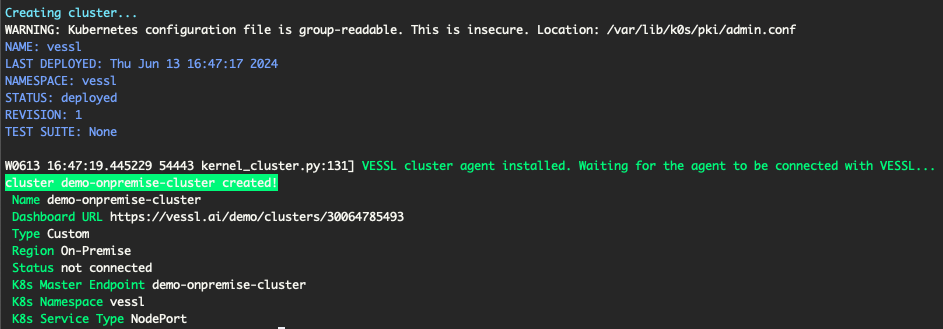
Confirm VESSL Cluster integration
To verify that the VESSL Cluster is properly integrated with your organization, run the following command: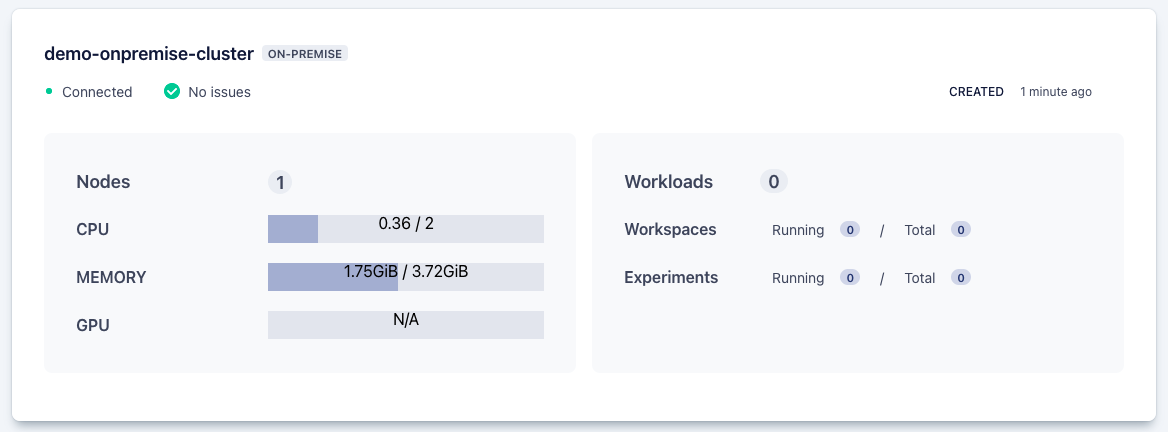
Limitation
Some features of VESSL are not available or guaranteed to work on your on-premises cluster. The following functionalities have limitations:VESSL Run
- Custom Resource Specs in YAML
- You cannot set custom resource specifications directly using YAML.
- For example, setting CPU, GPU, or memory directly in YAML is not supported.
- To use YAML for your VESSL Run, you must create a Resource Spec for your on-premises cluster.
VESSL Service
- Provisioned Mode
- You cannot create a VESSL Service in Provisioned mode on your on-premises cluster.
Frequently Asked questions
How can VESSL support on-premises clusters?
VESSL provides a set of scripts that help you install and manage Kubernetes clusters using k0s on your on-premises resources. By using these scripts, you can register clusters and utilize VESSL’s powerful MLOps features on your computing resources.How can I get token from the control plane node again?
You can create a new token by running the following command on the control plane node:Do we need CRI (docker or containerd) for Kubernetes?
k0s contains the required CRI for the Kubernetes cluster, so you don’t need to install it directly. For more information, you can find it here.Bootstrap script failed when setting the node
If the bootstrap script fails during node setup, verify the network configuration and ensure all prerequisites are met. Check the logs for specific error messages to diagnose the issue.Bootstrap script succeeded, but k8s pods are failed
If the bootstrap script succeeds but Kubernetes pods fail, check the pod logs for errors. Common issues include network misconfigurations, insufficient resources, or missing dependencies.How can I uninstall k0s?
To uninstall k0s, follow these steps:1
Stop and Reset k0s
2
Reboot the instance
3
Manual Removal (if needed)
If the k0s stop or k0s reset command hangs, manually remove the k0s components:
How can I allocate static IP to nodes?
To allocate static IPs to nodes, modify the bootstrap script as follows:1
Download the bootstrap script
2
Modify the script
In the run_k0s_controller_daemon() function, add In the run_k0s_worker_daemon() function, add
--enable-k0s-cloud-provider=true:--enable-cloud-provider=true:3
Run the modified bootstrap script
Execute the script on all controller nodes and worker nodes.
4
Annotate nodes with static IP
On the control plane node, run the following command:
How can I remove the VESSL cluster from the organization?
If you need to delete the on-premises cluster due to issues or because it is no longer needed, follow these steps:1
Stop k0s services on all nodes
2
Delete the cluster from the Web UI
Navigate to the Web UI and delete the created cluster from the organization.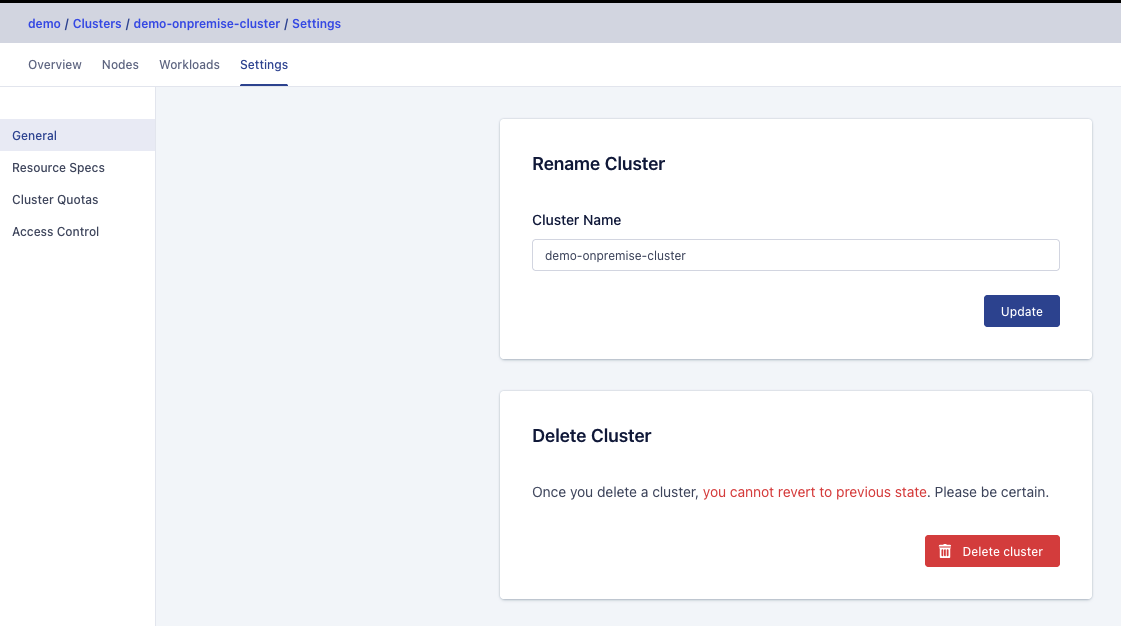
3
Detele the cluster from the CLI (if needed)
You can also delete the cluster using the CLI. Execute the following command:Replace cluster-name with the name of the cluster you wish to delete.
The Network Interface has changed. What do we do?
If your network interface or IP address changes, you need to reset and reconfigure k0s.1
Reset k0s
2
Reconfigure k0s
If the control plane’s network interface changes, you must reconfigure the control plane and all worker nodes.
3
Reboot the instance
Troubleshooting
VESSL Flare
If you encounter issues while setting up the on-premises cluster or while using an already set up on-premises cluster, you can get assistance from VESSL Flare. Click the link below to learn how to use VESSL Flare:VESSL Flare
Collects all of the node’s configuration and writes them to an archive file.
Support
For additional support, you have the following options:- General Support: Use Hubspot or send an email to support@vessl.ai.
- Professional Support: If you require professional support, contact sales@vessl.ai for a dedicated support channel.