> ## Documentation Index
> Fetch the complete documentation index at: https://docs.vessl.ai/llms.txt
> Use this file to discover all available pages before exploring further.
# Overview
VESSL provides a robust, scalable, and flexible **storage** system integrated seamlessly into your AI/ML development workflow. It supports both managed and external storage options, allowing for secure and efficient storage of diverse data types such as models, logs, and datasets.
### What is Volume?
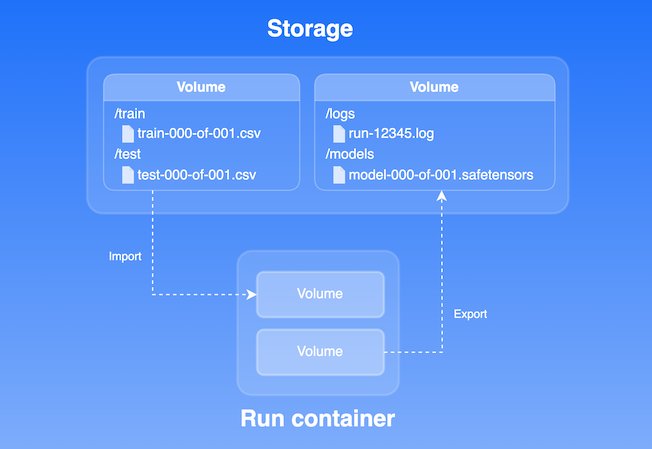
A **volume** is the unit of storage operation in VESSL, which can be imported or mounted to the workload container during the initialization step. This allows data to be accessible throughout the execution process. After the run commands are executed, volumes can also be exported for further use.
 ### Key features
1. **Automatic storage provisioning**: Files and directories are fully managed in VESSL Storage.
2. **Flexibility with external storage**: Integrate with external storage systems, including AWS S3, Google Cloud Storage, and on-premises NFS systems, without data migration.
3. **Seamless integration to workloads**: All volumes in the storage can either be imported or mounted directly to machine learning workloads, including [runs](../run/overview), [workspaces](../workspace/overview), [services](../service/overview), and [pipelines](../pipeline/overview). This ensure quick access to necessary data, optimizing performance and minimizing initialization time during operations.
4. **Exporting artifacts to storage**: All artifacts generated by your workloads, such as logs, metrics, and model checkpoints, can be exported to a volume in storage. This ensures that important results and data are securely stored and easily accessible for future use or analysis.
Fully managed storage system within the platform
Integrate external cloud or on-prem storage into the platform
### Key features
1. **Automatic storage provisioning**: Files and directories are fully managed in VESSL Storage.
2. **Flexibility with external storage**: Integrate with external storage systems, including AWS S3, Google Cloud Storage, and on-premises NFS systems, without data migration.
3. **Seamless integration to workloads**: All volumes in the storage can either be imported or mounted directly to machine learning workloads, including [runs](../run/overview), [workspaces](../workspace/overview), [services](../service/overview), and [pipelines](../pipeline/overview). This ensure quick access to necessary data, optimizing performance and minimizing initialization time during operations.
4. **Exporting artifacts to storage**: All artifacts generated by your workloads, such as logs, metrics, and model checkpoints, can be exported to a volume in storage. This ensures that important results and data are securely stored and easily accessible for future use or analysis.
Fully managed storage system within the platform
Integrate external cloud or on-prem storage into the platform