> ## Documentation Index
> Fetch the complete documentation index at: https://docs.vessl.ai/llms.txt
> Use this file to discover all available pages before exploring further.
# Pipeline revisions
## Revisions dashboard
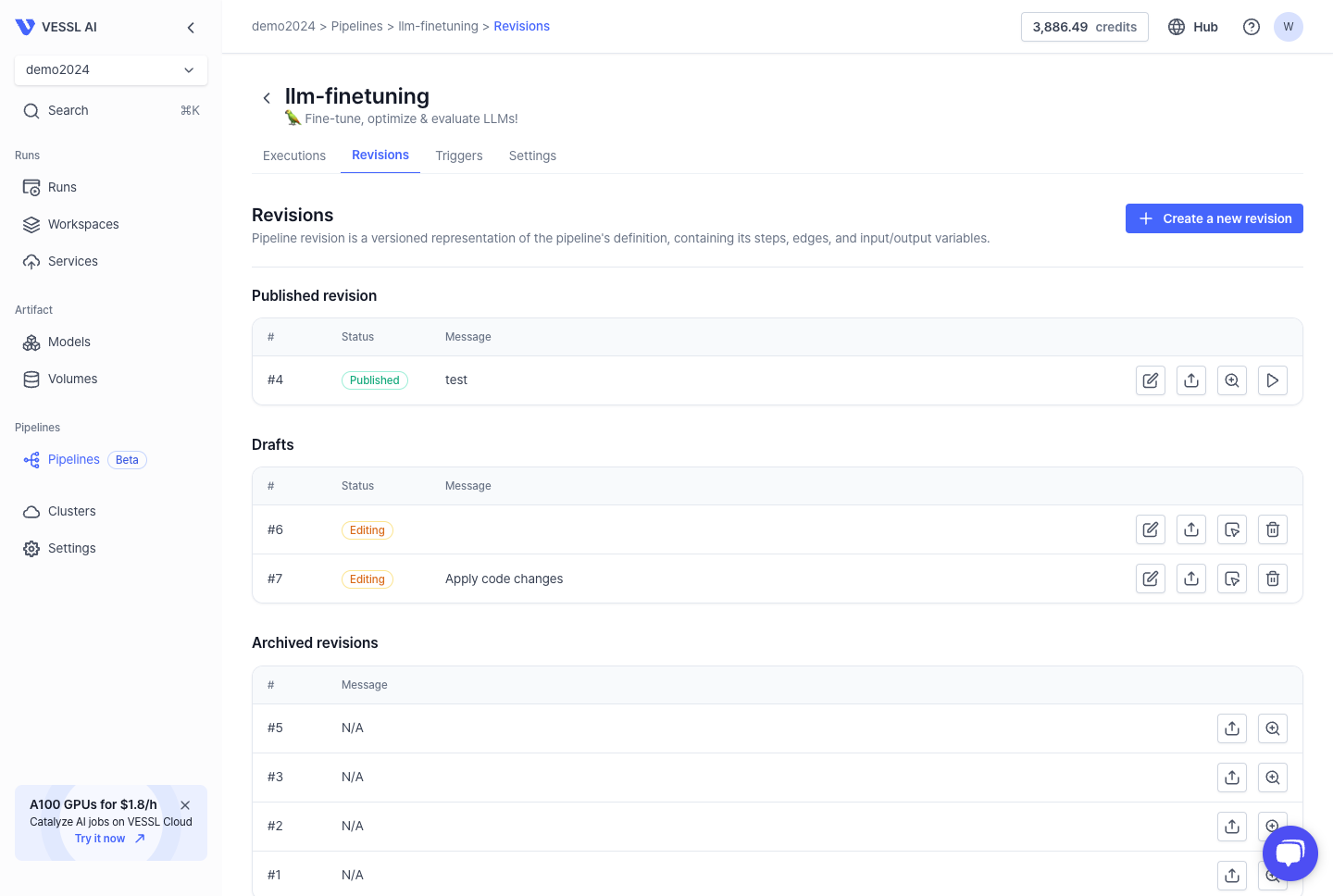
The Revisions dashboard offers an overview of the revision statuses. It enables you to modify a specific version of a pipeline that consists of a series of steps.
 ### Revision states
There are three states to revise each step:
* **Published**: The pipeline revision is published and available for use in the next execution.
* **Drafts (Editable)**: The pipeline revision is currently in an editable state.
* **Archived**: The pipeline revision has been archived for future reference.
### Revision editor -- actions on revisions
You can edit the pipeline revision with two methods:
* **Web console**
* **YAML manifest**
#### Edit revision using web console
To edit the pipeline revision using the web console, click **edit icon** on the editing revision list.
### Revision states
There are three states to revise each step:
* **Published**: The pipeline revision is published and available for use in the next execution.
* **Drafts (Editable)**: The pipeline revision is currently in an editable state.
* **Archived**: The pipeline revision has been archived for future reference.
### Revision editor -- actions on revisions
You can edit the pipeline revision with two methods:
* **Web console**
* **YAML manifest**
#### Edit revision using web console
To edit the pipeline revision using the web console, click **edit icon** on the editing revision list.
When you navigate to the revision editor, you can see the page with the following components. Here is the description of the components on the revision editor page:
* **Quick menu**: The tool box where you can expand or collapse the tools such as `Step List` and `Pipeline Variables`.
* **Step list**: The list of steps that define each action of the pipeline. You can drag-and-drop the steps to the canvas.
* **Dependency graph**: The connection of each step and dependency of the editing revision. You can click each step on the graph to edit the details of the step.
* **Pipeline variables**: The list of pipeline variables that can be injected in the pipeline steps.
### Pipeline steps
You can drag and drop the steps from the **Step list** to the **Dependency graph** to define the pipeline steps. You can also connect the steps by dragging the arrow from the output of the step to the input of the next step.
Manage your pipeline steps
### Pipeline variables
Pipeline variables are working similarly to the environment variables in the pipeline execution. You can define the pipeline variables in the **Variables** tab and use them in the pipeline steps.
Manage your pipeline environment
Once you finish editing the pipeline revision, click the `Publish` button on the top right corner to publish the revision.
## Edit revision using YAML manifest
Managing pipeline revisions with a YAML manifest allows for easy tracking, applying updates, and sharing workflow definitions with others. In Pipeline revisions, there are two ways to import a YAML manifest:
* Import YAML file
* Paste a YAML configuration
Try out the demo below:
### Sample YAML manifest
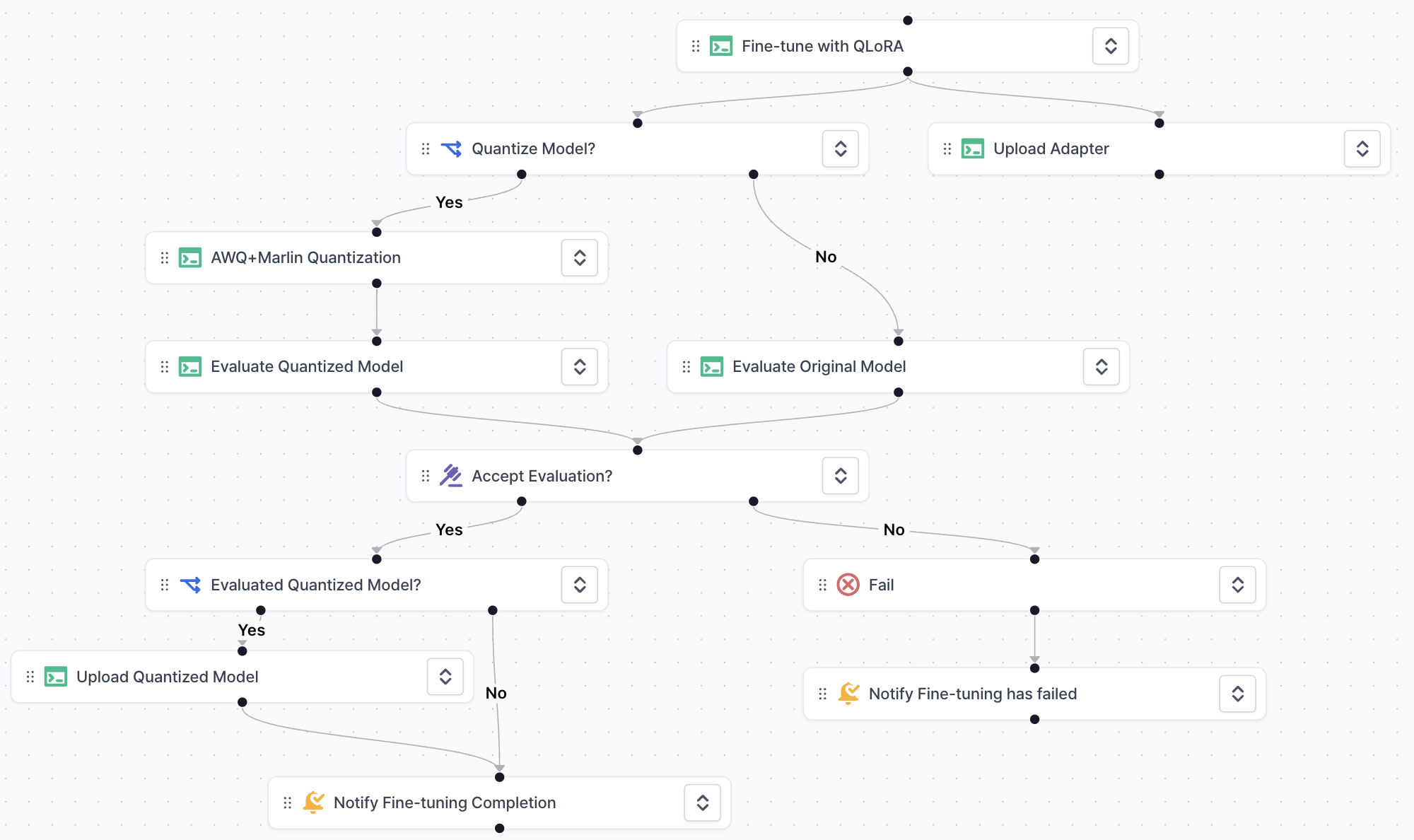
Here is the sample YAML manifest for fine-tuning an LLM and uploading the quantized model to the Hugging Face model registry:
Replace the following variables on the sample YAML manifest with your values:
* `{HUGGINGFACE_TOKEN}`: Your Huggingface token to access the model registry
* `{LORA_ADAPTER_NAME}`: Huggingface Repository name of QLoRA adapter to upload
* `{QUANTIZED_MODEL_NAME}`: Huggingface Repository name of quantized model
```yaml llm-finetuning.yaml theme={null}
api_version: v1
variables:
HF_TOKEN:
description: Hugginface token to access to model registry
required: true
default: {HUGGINGFACE_TOKEN}
BASE_MODEL_NAME:
description: Base LLM name to fine-tune
options:
- meta-llama/Meta-Llama-3.1-8B-Instruct
- mistralai/Mistral-Large-Instruct-2407
required: true
default: meta-llama/Meta-Llama-3.1-8B-Instruct
ADAPTER_NAME:
description: Repository name of QLoRA adapter to upload
required: true
default: {LORA_ADAPTER_NAME}
QUANTIZE_MODEL:
description: Whether to quantize trained model for production usage
options:
- "yes"
- "no"
required: true
default: "yes"
QUANTIZED_MODEL_NAME:
description: Repository name of quantized model
required: true
default: {QUANTIZED_MODEL_NAME}
steps:
- key: Fine-tune-with-QLoRA
title: Fine-tune with QLoRA
type: v1/run
description: Fine-tune model with QLoRA
spec:
input_variables:
BASE_MODEL_NAME:
type: pipeline_variable
value: BASE_MODEL_NAME
HF_TOKEN:
type: pipeline_variable
value: HF_TOKEN
run_spec:
name: Fine-tune with QLoRA
description: Fine-tune model with QLoRA
resources:
cluster: vessl-oci-sanjose
preset: gpu-l4-small-spot
image: quay.io/vessl-ai/cuda:12.4-r4
import:
/code/:
git:
url: github.com/vessl-ai/examples.git
ref: main
export:
/root/output/: vessl-artifact://
run: |-
cd /code/pipelines/pipelines-quickstart/llm-finetuning
pip install torch==2.2.0
pip install -r requirements.txt
python finetune.py \
--base-model-name $BASE_MODEL_NAME \
--checkpoint-path /root/output/checkpoints \
--output-model-name /root/output/adapter \
--train-epochs 4 \
--lora-rank 16
env:
BASE_MODEL_NAME:
source: inject
HF_TOKEN:
source: inject
- key: Quantize-Model
title: Quantize Model?
type: v1/if
depends_on:
- Fine-tune-with-QLoRA
spec:
condition: ${QUANTIZE_MODEL} == yes
- key: Upload-Adapter
title: Upload Adapter
type: v1/run
depends_on:
- Fine-tune-with-QLoRA
spec:
input_variables:
ADAPTER_NAME:
type: pipeline_variable
value: ADAPTER_NAME
HF_TOKEN:
type: pipeline_variable
value: HF_TOKEN
volumes:
/model/:
source: pipeline-step
source_step:
step_key: Fine-tune-with-QLoRA
volume_claim_name: /root/output/
run_spec:
name: Upload Adapter
description: ""
resources:
cluster: vessl-oci-sanjose
preset: cpu-medium-spot
image: quay.io/vessl-ai/python:3.10-r18
import:
/model/: vessl-artifact://
run: |-
pip install -U "huggingface_hub[cli]"
huggingface-cli upload $ADAPTER_NAME /model/adapter .
env:
ADAPTER_NAME:
source: inject
HF_TOKEN:
source: inject
- key: AWQ-Marlin-Quantization
title: AWQ+Marlin Quantization
type: v1/run
depends_on:
- Quantize-Model:yes
spec:
input_variables:
ADAPTER_NAME:
type: pipeline_variable
value: ADAPTER_NAME
BASE_MODEL_NAME:
type: pipeline_variable
value: BASE_MODEL_NAME
HF_TOKEN:
type: pipeline_variable
value: HF_TOKEN
run_spec:
name: AWQ+Marlin Quantization
description: ""
resources:
cluster: vessl-oci-sanjose
preset: gpu-l4-small-spot
image: quay.io/vessl-ai/cuda:12.4-r4
import:
/code/:
git:
url: github.com/vessl-ai/examples.git
ref: main
export:
/root/output/: vessl-artifact://
run: |-
cd /code/pipelines/pipelines-quickstart/llm-quantization
pip install torch==2.3.1
pip install -r requirements.txt
python merge_and_quantize.py \
--base-model-name $BASE_MODEL_NAME \
--adapter-name $ADAPTER_NAME \
--quantized-model-name /root/output
env:
ADAPTER_NAME:
source: inject
BASE_MODEL_NAME:
source: inject
HF_TOKEN:
source: inject
- key: Evaluate-Quantized-Model
title: Evaluate Quantized Model
type: v1/run
depends_on:
- AWQ-Marlin-Quantization
spec:
input_variables:
HF_TOKEN:
type: pipeline_variable
value: HF_TOKEN
QUANTIZED_MODEL_NAME:
type: pipeline_variable
value: QUANTIZED_MODEL_NAME
volumes:
/model/:
source: pipeline-step
source_step:
step_key: AWQ-Marlin-Quantization
volume_claim_name: /root/output/
run_spec:
name: Evaluate Quantized Model
description: ""
resources:
cluster: vessl-oci-sanjose
preset: gpu-l4-small-spot
image: quay.io/vessl-ai/cuda:12.4-r4
import:
/code/:
git:
url: github.com/vessl-ai/examples.git
ref: main
/model/: vessl-artifact://
run: |-
cd /code/pipelines/pipelines-quickstart/llm-finetuning-eval
pip install torch==2.3.1
pip install -r requirements.txt
pip install "git+https://github.com/IST-DASLab/marlin"
python evaluate.py \
--model-name /model \
--quantization awq \
--prompts "What is the capital of France?" "How does a transformer model work?"
env:
HF_TOKEN:
source: inject
QUANTIZED_MODEL_NAME:
source: inject
- key: Accept-Evaluation
title: Accept Evaluation?
type: v1/manual_judgment
description: See the logs from "Evaluate Model" and decide whether to push the fine-tuned model to production.
depends_on:
- Evaluate-Quantized-Model
- Evaluate-Original-Model
spec:
assignee_email_addresses:
- sample_email@foo.bar
- key: Fail
title: Fail
type: v1/fail
depends_on:
- Accept-Evaluation:no
spec: {}
- key: Upload-Quantized-Model
title: Upload Quantized Model
type: v1/run
depends_on:
- Evaluated-Quantized-Model:yes
spec:
input_variables:
HF_TOKEN:
type: pipeline_variable
value: HF_TOKEN
QUANTIZED_MODEL_NAME:
type: pipeline_variable
value: QUANTIZED_MODEL_NAME
volumes:
/model/:
source: pipeline-step
source_step:
step_key: AWQ-Marlin-Quantization
volume_claim_name: /root/output/
run_spec:
name: Upload Quantized Model
description: ""
resources:
cluster: vessl-oci-sanjose
preset: cpu-medium-spot
image: quay.io/vessl-ai/python:3.10-r18
import:
/model/: vessl-artifact://
run: |-
pip install -U "huggingface_hub[cli]"
huggingface-cli upload $QUANTIZED_MODEL_NAME /model .
env:
HF_TOKEN:
source: inject
QUANTIZED_MODEL_NAME:
source: inject
- key: Notify-Fine-tuning-Completion
title: Notify Fine-tuning Completion
type: v1/notification
depends_on:
- Evaluated-Quantized-Model:no
- Upload-Quantized-Model
spec:
email_addresses:
- sample_email@foo.bar
email_subject: '[llm-finetuning] Fine tuning job has finished'
email_contents: '😉 Fine-tuning has successfully completed. Please check the logs!'
- key: Notify-Fine-tuning-has-failed
title: Notify Fine-tuning has failed
type: v1/notification
depends_on:
- Fail
spec:
email_addresses:
- sample_email@foo.bar
email_subject: '[llm-finetuning] Fine-tuning has failed'
email_contents: '😱 Fine-tuning has failed. Please check the logs.'
- key: Evaluate-Original-Model
title: Evaluate Original Model
type: v1/run
depends_on:
- Quantize-Model:no
spec:
input_variables:
ADAPTER_NAME:
type: pipeline_variable
value: ADAPTER_NAME
HF_TOKEN:
type: pipeline_variable
value: HF_TOKEN
run_spec:
name: Evaluate Original Model
description: ""
resources:
cluster: vessl-oci-sanjose
preset: gpu-l4-small-spot
image: quay.io/vessl-ai/cuda:12.4-r4
import:
/code/:
git:
url: github.com/vessl-ai/examples.git
ref: main
run: |-
cd /code/pipelines/pipelines-quickstart/llm-finetuning-eval
pip install torch==2.3.1
pip install -r requirements.txt
python evaluate.py \
--model-name $ADAPTER_NAME \
--prompts "What is the capital of France?" "How does a transformer model work?"
env:
ADAPTER_NAME:
source: inject
HF_TOKEN:
source: inject
- key: Evaluated-Quantized-Model
title: Evaluated Quantized Model?
type: v1/if
depends_on:
- Accept-Evaluation:yes
spec:
condition: ${QUANTIZE_MODEL} == yes
```