> ## Documentation Index
> Fetch the complete documentation index at: https://docs.vessl.ai/llms.txt
> Use this file to discover all available pages before exploring further.
# Phi-4 fine-tuning
> Fine-tune Phi-4 with counselling dataset
This example fine-tunes Phi-4 with a counselling dataset, illustrating how VESSL offloads the infrastructural challenges of large-scale AI workloads and helps you train multi-billion-parameter models in hours, not weeks.
This is the most compute-intensive workload yet but you will see how VESSL's training stack enables you to seamlessly scale and execute multi-node training. For a more in-depth introduction, refer to our [blog post](https://blog.vessl.ai/en/posts/ai-infrastructure-llm).
**Prerequisite for gated models** — We do not handle certain gated models in
"Get Started." If you want to utilize certain gated models on Hugging Face,
please refer to the [Hugging Face
documentation](https://huggingface.co/docs). Ensure you meet all requirements
specified there before proceeding with the gated models.
For non-gated quantized models, please refer to the relevant links
provided below.
\* [https://huggingface.co/unsloth](https://huggingface.co/unsloth)
\*
[https://huggingface.co/casperhansen](https://huggingface.co/casperhansen)
\* [https://huggingface.co/TheBloke](https://huggingface.co/TheBloke)
Try out the Quickstart example with a single click on **VESSL Hub**.
## What you will do
 * Fine-tune an LLM with zero-to-minimum setup
* Mount a custom dataset
* Store and export model [volumes](/guides/storages/overview)
## Writing the YAML file
Let's fill in the `phi-4-fine-tuning.yaml` file.
Let's spin up an instance.
```yaml theme={null}
name: phi-4-finetuning
description: Fine-tune Phi-4 on counselling datasets
resources:
cluster: vessl-kr-a100-80g-sxm
preset: gpu-a100-80g-small
image: quay.io/vessl-ai/torch:2.3.1-cuda12.1-r5
```
Here, in addition to our GitHub repo, we are also mounting a Hugging Face dataset.
As with our HF model, mounting data is as simple as referencing the URL beginning with the `hf://` scheme -- this goes the same for other cloud storages as well, `s3://` for Amazon S3 for example.
In this example, we are using mental health counselling conversations dataset hosted on Hugging Face.
```yaml theme={null}
name: phi-4-finetuning
description: Fine-tune Phi-4 on counselling datasets
resources:
cluster: vessl-kr-a100-80g-sxm
preset: gpu-a100-80g-small
image: quay.io/vessl-ai/torch:2.3.1-cuda12.1-r5
import:
/code/:
git:
url: https://github.com/vessl-ai/examples
ref: main
/dataset/: hf://huggingface.co/datasets/Amod/mental_health_counseling_conversations
```
Now that we have the code and dataset mounted on our remote workload, we are ready to define the run command. Let's install additional Python dependencies and run `main.py`.
```yaml theme={null}
name: phi-4-finetuning
description: Fine-tune Phi-4 on counselling datasets
resources:
cluster: vessl-kr-a100-80g-sxm
preset: gpu-a100-80g-small
image: quay.io/vessl-ai/torch:2.3.1-cuda12.1-r5
import:
/code/:
git:
url: https://github.com/vessl-ai/examples
ref: main
/dataset/: hf://huggingface.co/datasets/Amod/mental_health_counseling_conversations
run:
- command: |-
pip install -r requirements.txt
python main.py \
--model_name_or_path unsloth/phi-4-unsloth-bnb-4bit \
--dataset_name /dataset/ \
--output_dir /artifacts/ \
--max_length 2048 \
--num_train_epochs 1 \
--logging_steps 5 \
--bf16 True \
--learning_rate 1e-5 \
--weight_decay 1e-2 \
--per_device_train_batch_size 2 \
--per_device_eval_batch_size 2 \
--gradient_accumulation_steps 4 \
--gradient_checkpointing True \
--peft_type LORA \
--load_in_4bit True \
--bnb_4bit_use_double_quant True \
--upload_model True \
--repository_name phi-4-mini-counselor
workdir: /code/runs/finetune-llms
```
You can keep track of model checkpoints by dedicating an export volume to the workload. Once training is finished, the trained models are uploaded to the artifact folder as model checkpoints.
```yaml theme={null}
name: phi-4-finetuning
description: Fine-tune Phi-4 on counselling datasets
resources:
cluster: vessl-kr-a100-80g-sxm
preset: gpu-a100-80g-small
image: quay.io/vessl-ai/torch:2.3.1-cuda12.1-r5
import:
/code/:
git:
url: https://github.com/vessl-ai/examples
ref: main
/dataset/: hf://huggingface.co/datasets/Amod/mental_health_counseling_conversations
run:
- command: |-
pip install -r requirements.txt
python main.py \
--model_name_or_path unsloth/phi-4-unsloth-bnb-4bit \
--dataset_name /dataset/ \
--output_dir /artifacts/ \
--max_length 2048 \
--num_train_epochs 1 \
--logging_steps 5 \
--bf16 True \
--learning_rate 1e-5 \
--weight_decay 1e-2 \
--per_device_train_batch_size 2 \
--per_device_eval_batch_size 2 \
--gradient_accumulation_steps 4 \
--gradient_checkpointing True \
--peft_type LORA \
--load_in_4bit True \
--bnb_4bit_use_double_quant True \
--upload_model True \
--repository_name phi-4-mini-counselor
workdir: /code/runs/finetune-llms
export:
/artifacts/: volume://vessl-storage
```
## Running the run
You can create a new run with VESSL CLI:
`vessl run create -f phi-4-fine-tuning.yaml`
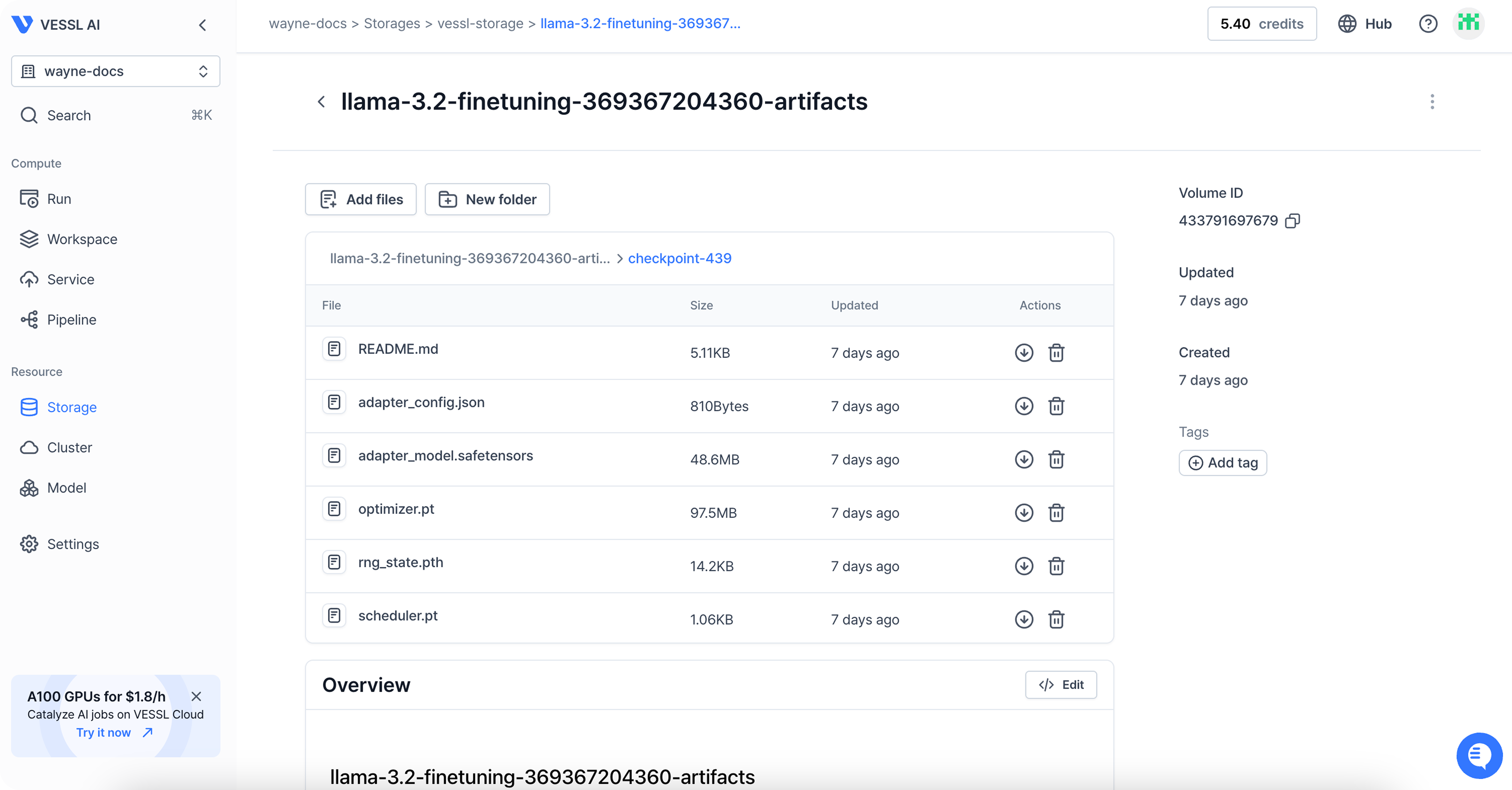
Once the run is completed, you can follow the link in the terminal to see the result of the run.
You can find the files under **Storage**.
* Fine-tune an LLM with zero-to-minimum setup
* Mount a custom dataset
* Store and export model [volumes](/guides/storages/overview)
## Writing the YAML file
Let's fill in the `phi-4-fine-tuning.yaml` file.
Let's spin up an instance.
```yaml theme={null}
name: phi-4-finetuning
description: Fine-tune Phi-4 on counselling datasets
resources:
cluster: vessl-kr-a100-80g-sxm
preset: gpu-a100-80g-small
image: quay.io/vessl-ai/torch:2.3.1-cuda12.1-r5
```
Here, in addition to our GitHub repo, we are also mounting a Hugging Face dataset.
As with our HF model, mounting data is as simple as referencing the URL beginning with the `hf://` scheme -- this goes the same for other cloud storages as well, `s3://` for Amazon S3 for example.
In this example, we are using mental health counselling conversations dataset hosted on Hugging Face.
```yaml theme={null}
name: phi-4-finetuning
description: Fine-tune Phi-4 on counselling datasets
resources:
cluster: vessl-kr-a100-80g-sxm
preset: gpu-a100-80g-small
image: quay.io/vessl-ai/torch:2.3.1-cuda12.1-r5
import:
/code/:
git:
url: https://github.com/vessl-ai/examples
ref: main
/dataset/: hf://huggingface.co/datasets/Amod/mental_health_counseling_conversations
```
Now that we have the code and dataset mounted on our remote workload, we are ready to define the run command. Let's install additional Python dependencies and run `main.py`.
```yaml theme={null}
name: phi-4-finetuning
description: Fine-tune Phi-4 on counselling datasets
resources:
cluster: vessl-kr-a100-80g-sxm
preset: gpu-a100-80g-small
image: quay.io/vessl-ai/torch:2.3.1-cuda12.1-r5
import:
/code/:
git:
url: https://github.com/vessl-ai/examples
ref: main
/dataset/: hf://huggingface.co/datasets/Amod/mental_health_counseling_conversations
run:
- command: |-
pip install -r requirements.txt
python main.py \
--model_name_or_path unsloth/phi-4-unsloth-bnb-4bit \
--dataset_name /dataset/ \
--output_dir /artifacts/ \
--max_length 2048 \
--num_train_epochs 1 \
--logging_steps 5 \
--bf16 True \
--learning_rate 1e-5 \
--weight_decay 1e-2 \
--per_device_train_batch_size 2 \
--per_device_eval_batch_size 2 \
--gradient_accumulation_steps 4 \
--gradient_checkpointing True \
--peft_type LORA \
--load_in_4bit True \
--bnb_4bit_use_double_quant True \
--upload_model True \
--repository_name phi-4-mini-counselor
workdir: /code/runs/finetune-llms
```
You can keep track of model checkpoints by dedicating an export volume to the workload. Once training is finished, the trained models are uploaded to the artifact folder as model checkpoints.
```yaml theme={null}
name: phi-4-finetuning
description: Fine-tune Phi-4 on counselling datasets
resources:
cluster: vessl-kr-a100-80g-sxm
preset: gpu-a100-80g-small
image: quay.io/vessl-ai/torch:2.3.1-cuda12.1-r5
import:
/code/:
git:
url: https://github.com/vessl-ai/examples
ref: main
/dataset/: hf://huggingface.co/datasets/Amod/mental_health_counseling_conversations
run:
- command: |-
pip install -r requirements.txt
python main.py \
--model_name_or_path unsloth/phi-4-unsloth-bnb-4bit \
--dataset_name /dataset/ \
--output_dir /artifacts/ \
--max_length 2048 \
--num_train_epochs 1 \
--logging_steps 5 \
--bf16 True \
--learning_rate 1e-5 \
--weight_decay 1e-2 \
--per_device_train_batch_size 2 \
--per_device_eval_batch_size 2 \
--gradient_accumulation_steps 4 \
--gradient_checkpointing True \
--peft_type LORA \
--load_in_4bit True \
--bnb_4bit_use_double_quant True \
--upload_model True \
--repository_name phi-4-mini-counselor
workdir: /code/runs/finetune-llms
export:
/artifacts/: volume://vessl-storage
```
## Running the run
You can create a new run with VESSL CLI:
`vessl run create -f phi-4-fine-tuning.yaml`
Once the run is completed, you can follow the link in the terminal to see the result of the run.
You can find the files under **Storage**.
 ## Behind the scenes
With VESSL, you can launch a full-scale LLM fine-tuning workload on any cloud, at any scale, without worrying about these underlying system backends.
* **Model checkpointing** — VESSL stores `.pt` files to mounted volumes or model registry and ensures seamless checkpointing of fine-tuning progress.
* **GPU failovers** — VESSL can autonomously detect GPU failures, recover failed containers, and automatically re-assign workload to other GPUs.
* **Spot instances** — Spot instance on VESSL works with model checkpointing and export volumes, saving and resuming the progress of interrupted workloads safely.
* **Distributed training** — VESSL comes with native support for PyTorch `DistributedDataParallel` and simplifies the process for setting up multi-cluster, multi-node distributed training.
* **Autoscaling** — As more GPUs are released from other tasks, you can dedicate more GPUs to fine-tuning workloads. You can do this on VESSL by adding the following to your existing fine-tuning YAML.
## Tips and tricks
This example utilizes callbacks based on the Hugging Face [Transformers library](https://huggingface.co/docs/transformers/en/index) (see [here](https://github.com/vessl-ai/examples/blob/a435036fca3e27431a058694cdcda0dedb30d28a/finetune-llms/main.py#L44)). Therefore, metrics are automatically plotted, and no additional logging is required. VESSL supports integration with the Transformers library. By using the callback available in the Python SDK, metrics are automatically plotted, and users can choose to automatically upload models to **VESSL Models** if desired. For detailed usage, please refer to the [Transformers integration page](https://docs.vessl.ai/reference/sdk/integrations/transformers).
## Using our web interface
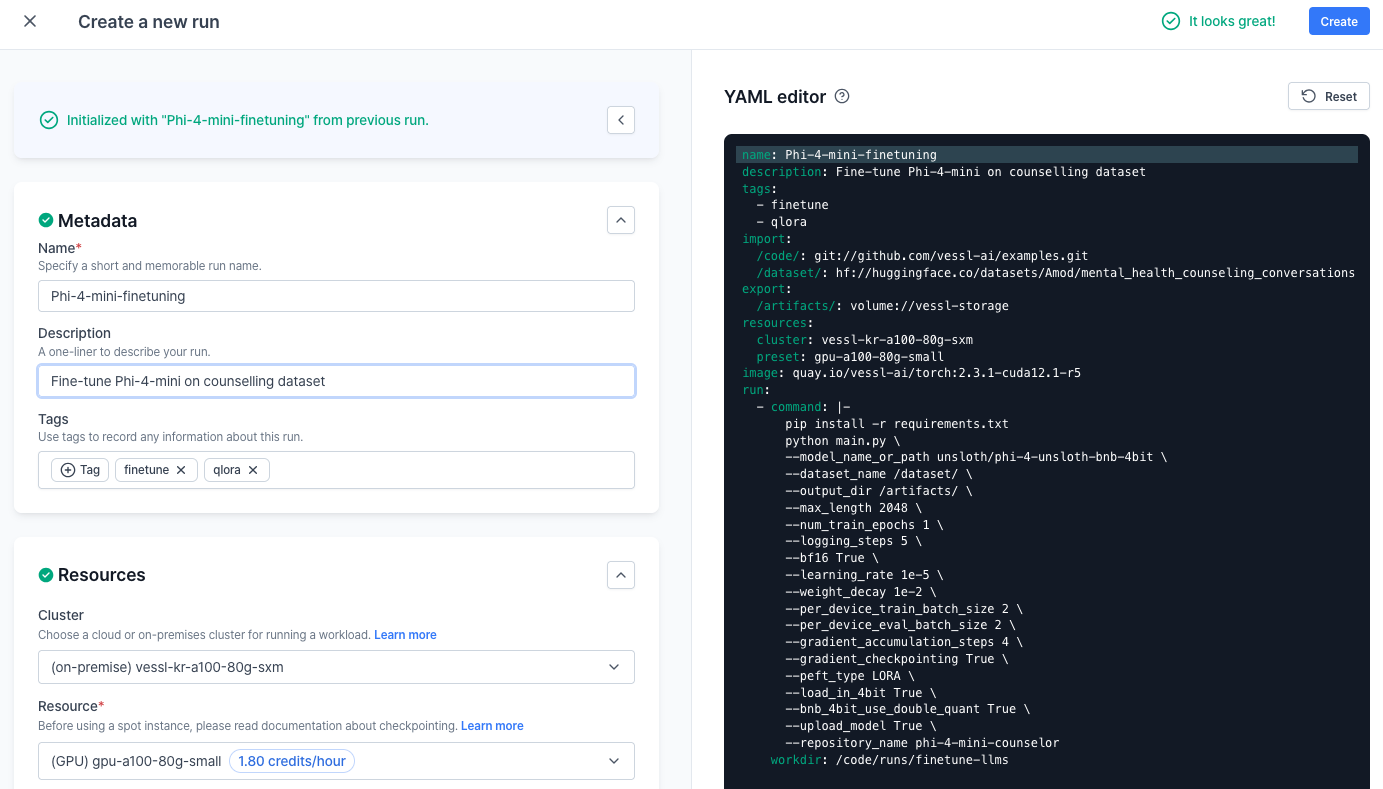
You can repeat the same process on the web. Head over to your **Organization**, select a project, and create a **New run**.
## Behind the scenes
With VESSL, you can launch a full-scale LLM fine-tuning workload on any cloud, at any scale, without worrying about these underlying system backends.
* **Model checkpointing** — VESSL stores `.pt` files to mounted volumes or model registry and ensures seamless checkpointing of fine-tuning progress.
* **GPU failovers** — VESSL can autonomously detect GPU failures, recover failed containers, and automatically re-assign workload to other GPUs.
* **Spot instances** — Spot instance on VESSL works with model checkpointing and export volumes, saving and resuming the progress of interrupted workloads safely.
* **Distributed training** — VESSL comes with native support for PyTorch `DistributedDataParallel` and simplifies the process for setting up multi-cluster, multi-node distributed training.
* **Autoscaling** — As more GPUs are released from other tasks, you can dedicate more GPUs to fine-tuning workloads. You can do this on VESSL by adding the following to your existing fine-tuning YAML.
## Tips and tricks
This example utilizes callbacks based on the Hugging Face [Transformers library](https://huggingface.co/docs/transformers/en/index) (see [here](https://github.com/vessl-ai/examples/blob/a435036fca3e27431a058694cdcda0dedb30d28a/finetune-llms/main.py#L44)). Therefore, metrics are automatically plotted, and no additional logging is required. VESSL supports integration with the Transformers library. By using the callback available in the Python SDK, metrics are automatically plotted, and users can choose to automatically upload models to **VESSL Models** if desired. For detailed usage, please refer to the [Transformers integration page](https://docs.vessl.ai/reference/sdk/integrations/transformers).
## Using our web interface
You can repeat the same process on the web. Head over to your **Organization**, select a project, and create a **New run**.
## What's next?
Next, let's see how you can serve and deploy your fine-tuned model to the cloud and create a text-generation API endpoint. For more details, refer to the updated [Phi-4-mini deployment guide](/guides/get-started/phi-4-deployment).
Serve & deploy vLLM-accelerated Phi-4-mini-reasoning
Deploy with VESSL Service Serverless mode